
AI strategy, media innovation, and practical growth systems.
I help brands and creators use AI, digital media, SEO, and automation to produce better content and grow with clarity.
Omar Alshal
-
12/09/2026
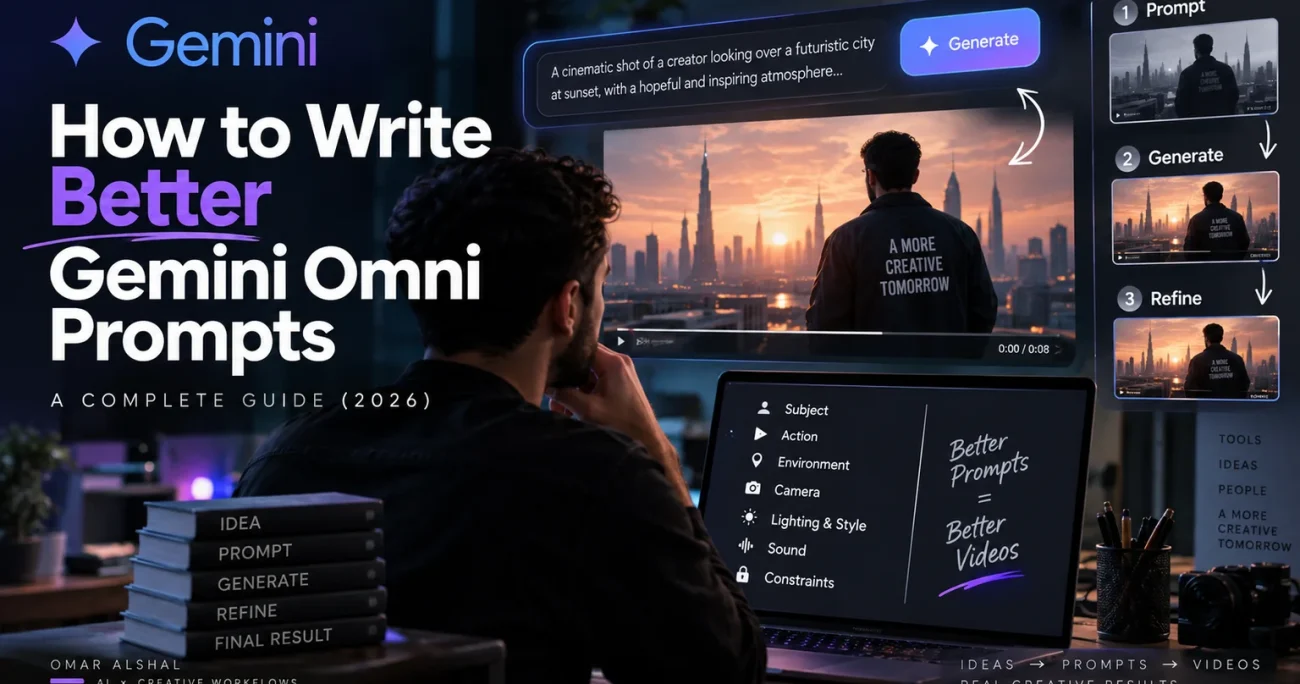
How to Write Better Gemini Omni Prompts: Complete Guide (2026)
Writing better Gemini Omni prompts is less about adding more words and more about giving the model better direction.
That is one of the biggest mindset changes creators need to make when moving from traditional AI video generators to Google’s Gemini Omni.
With many older video models, prompting often felt like writing an extremely detailed description and hoping the model followed as much of it as possible.
Gemini Omni works differently.
It can work with text, images, video and audio references, understand the context of a scene, generate video, and then let you continue refining that result through natural conversation.
That means the best prompt is not necessarily the longest one.
It is the one that clearly communicates what matters, what should happen, how the camera should behave, and what must remain unchanged.
QUICK ANSWER
A strong Gemini Omni prompt usually defines a clear subject, action, environment, camera direction, visual style and constraints. Start with one focused idea, review the result, and then refine individual elements instead of trying to solve everything in one giant prompt.
If you are looking for prompts you can copy and use immediately, I already have a separate guide featuring 25 Gemini Omni prompts for cinematic video, ads, social media and creative experiments.
This guide has a different purpose.
Here, we are going to learn how to write better Gemini Omni prompts yourself.
In this guide
What Makes Gemini Omni Prompting Different?
Gemini Omni combines Gemini’s reasoning capabilities with generative video creation and editing.
But one of the most important differences is that the workflow does not have to end after the first generation.
You can start with a prompt, generate a scene, and then continue modifying individual elements through natural-language instructions.
For example:
Keep everything unchanged. Replace the red car with a black SUV.
Then:
Keep the same scene and camera movement. Make the rain heavier.
Then:
Preserve everything else. Add warm reflections from the shop windows onto the wet street.
This turns prompting into something closer to directing and editing.
Official Google demo: Gemini Omni can combine different input types and continue editing generated video through natural-language instructions.
The Biggest Gemini Omni Prompting Mistake
One of the most common mistakes is trying to describe absolutely everything in the first prompt.
More detail can give you more control, but more words do not automatically produce a better video.
Consider this:
A beautiful cinematic dramatic realistic highly detailed atmospheric man walking through a beautiful cinematic street with incredible lighting and amazing realistic atmosphere…
There are plenty of adjectives.
But there are very few useful directing decisions.
We still do not know:
- what the main action is,
- how the subject should be framed,
- whether the camera moves,
- where the lighting comes from,
- what the important visual event is,
- or what must remain unchanged.
The problem is not lack of words.
The problem is lack of direction.
Don’t ask yourself, “How can I make this prompt longer?” Ask: “Which information would actually change the shot?”
The Gemini Omni Prompt Formula
I recommend thinking about a Gemini Omni prompt as seven possible building blocks:
- Subject — who or what matters?
- Action — what is actually happening?
- Environment — where and when?
- Camera — framing and movement.
- Lighting and Style — how should the scene feel?
- Sound — dialogue, ambience, music or effects.
- Constraints — what must remain unchanged or absent?
You do not necessarily need all seven elements every time.
But when a result keeps missing your intention, this structure makes it much easier to identify what the prompt is missing.

MASTER TEMPLATE
[Subject] performs [one clear action] in [environment]. Frame the scene as [shot size] with [camera movement]. Use [lighting] with a [visual style] finish. Audio: [sound/dialogue]. Preserve [important elements]. Avoid [unwanted elements].
1. Start With One Clear Intention
Before writing camera terminology, lighting instructions or technical details, decide what the viewer is supposed to experience.
For example:
A nervous young chef waits to hear whether a food critic liked his dish.
That already gives Gemini Omni more useful information than:
A chef standing inside a restaurant.
The first version contains narrative intention.
You can add technical direction after that.
Weak Prompt
A man walks through Cairo at night, cinematic.
Better Prompt
A middle-aged Egyptian man walks alone through a narrow Cairo street after midnight while checking over his shoulder as if someone is following him. Medium tracking shot moving backward in front of him. Warm shop lights mix with cool street lighting and reflections on the pavement. Realistic handheld documentary feel. Sound: distant traffic, footsteps and quiet city ambience. No cuts.
The second prompt does not simply contain more words.
It contains more useful decisions.
2. Give Gemini Omni One Primary Action
AI video prompts become much harder to control when too many important things happen simultaneously.
Consider this:
A woman walks into a café, orders coffee, talks to her friend, receives a phone call, runs outside, gets into a car and drives away.
That is an entire sequence compressed into one instruction.
Instead, identify the most important visual beat:
A woman enters a quiet café and notices someone unexpected sitting at the back table. She stops immediately.
Now Gemini Omni has one clear moment to stage.
If you need the rest of the sequence, create it through additional shots or follow-up generations.
3. Use Real Camera Language
Instead of saying:
Make the camera cinematic.
tell Gemini Omni what the camera actually does.
- Push in — slowly move closer to the subject.
- Pull back — reveal more of the environment.
- Tracking shot — move alongside or follow the subject.
- Dolly zoom — dramatically change perspective while keeping the subject similarly framed.
- Locked off — no camera movement.
- Over-the-shoulder — frame from behind another character.
- POV — show the scene from the character’s perspective.
- Orbit — move around the subject.

PROMPTING TIP
If camera movement is essential to the idea, mention it early. Do not bury your most important directing instruction at the end of a huge paragraph.
4. Describe Lighting With a Source
“Beautiful lighting” does not tell the model very much.
Lighting becomes more useful when you describe where it comes from and what it does.
Instead of:
Beautiful cinematic lighting.
try:
Warm sunlight enters through one window from camera left, creating long shadows across the wooden floor while the opposite side of the room remains cool and dim.
Useful lighting descriptions include:
- soft overcast daylight,
- one warm practical lamp,
- cold fluorescent office lighting,
- golden-hour backlight,
- neon reflections from storefronts,
- hard midday sunlight,
- soft window light,
- blue-hour ambient light.
The goal is not to fill every prompt with photography terminology.
The goal is to make the instruction visually meaningful.
5. Stop Stacking Style Adjectives
A common AI prompting habit is stacking every attractive adjective we can think of:
Ultra realistic cinematic dramatic premium beautiful moody atmospheric editorial…
This gives the model several overlapping ideas without a clear hierarchy.
Instead, choose one coherent visual direction.
Grounded documentary realism with natural skin texture and restrained color grading.
or:
High-end luxury product commercial with precise studio reflections and minimal composition.
or:
Handcrafted stop-motion aesthetic using painted wood, felt and visible material texture.
A coherent direction is usually more useful than ten generic quality adjectives.
6. Use References When Words Are Not Enough
This is one of Gemini Omni’s most important advantages.
You do not always need to describe everything.
If a particular person, product, movement, location or timing needs to remain consistent, give the model a reference and explain what that reference controls.
- Image reference: preserve character identity, a product, a location or visual style.
- Video reference: preserve movement, composition, timing or camera behavior.
- Audio reference: synchronize action, dialogue, beats or mood.
- Multiple references: combine identity, motion, environment and sound.

Character Reference
Use the supplied image as the exact character reference. Preserve facial identity, hairstyle and wardrobe throughout the shot.
Product Reference
Use the supplied product image as the exact design reference. Do not change its shape, color, logo placement or label.
Video Reference
Preserve the original camera movement and timing from the supplied video, but transform the environment into a rainy night street.
Audio Reference
Use the supplied audio as the timing reference. Synchronize the visual changes to the major beats while keeping the movement natural.
When consistency really matters, a reference is usually stronger than another paragraph of description.
7. Edit Gemini Omni Through Conversation
This is where the workflow becomes fundamentally different from traditional text-to-video prompting.
You do not necessarily need to throw away a good result because one element is wrong.
You can continue the conversation.
First edit
Keep everything unchanged. Replace the red car with a black SUV.
Second edit
Keep the same scene and camera movement. Make the rain heavier.
Third edit
Preserve everything else. Add warm reflections from the shop windows onto the wet street.
Google demonstrates changing environments, camera angles and other elements through multi-turn natural-language editing.
8. Tell Gemini Omni What Must Not Change
When editing an existing result, creators often focus entirely on describing the new change.
But the other half of the instruction is equally important:
What should remain untouched?
Instead of:
Change the background to a beach.
try:
Change only the background to a quiet beach at sunset. Preserve the person’s face, hairstyle, body position, clothes, camera angle, movement and original audio.
The model now understands both the requested change and the boundaries around it.
9. Edit One Important Thing at a Time
Imagine your first result is almost correct, but:
- the background is wrong,
- the camera moves too quickly,
- the character’s jacket changed color,
- and the final shot ends too soon.
You could put all four corrections into one giant instruction.
But when precision matters, I prefer a simpler workflow.
Turn 1
Preserve everything else. Restore the black jacket from the original reference.
Turn 2
Keep the current character and scene unchanged. Reduce the camera speed by approximately half.
Turn 3
Keep everything else exactly as it is. Replace only the background with the nighttime street from the reference image.
Turn 4
Hold the final composition for two additional seconds after the character stops moving.
This makes it much easier to understand which instruction improved — or damaged — the result.
10. Be Precise When Prompting Text
If your video needs readable on-screen text, do not treat the words as decoration.
Specify:
- the exact wording,
- when it appears,
- where it appears,
- how long it remains visible,
- how it enters or moves,
- and whether any additional text is allowed.
Weak Prompt
Add a Summer Sale title.
Better Prompt
At 00:04, reveal the exact text “SUMMER SALE” centered on screen in bold white uppercase letters. Keep it visible for two seconds. Do not add any other words, captions or logos.
The Three-Pass Gemini Omni Workflow
If you want a repeatable process, stop trying to generate the perfect result immediately.
I recommend working in three stages:

Pass 1: Build the Core Shot
Define:
- the subject,
- the main action,
- the environment,
- the camera,
- and the basic visual direction.
Do not obsess over tiny details yet.
Pass 2: Lock What Matters
Identify the elements you cannot afford to lose:
- character identity,
- product design,
- camera path,
- architecture or location,
- logos and text,
- important timing.
Use references and explicit preservation instructions where necessary.
Pass 3: Polish One Variable at a Time
Once the core result is working, refine individual elements:
- lighting,
- color,
- background details,
- sound,
- camera speed,
- timing,
- small visual details.
OMAR’S TAKE
The real skill with Gemini Omni is not writing one magical prompt. It is knowing what to tell the model first, what to lock, and what to refine after you see the result.
How to Fix a Gemini Omni Prompt That Is Not Working
Before generating everything again, identify exactly what failed.
If the Character Changes
Restore the facial identity and hairstyle from the reference image. Preserve all other elements of the current video.
If the Camera Is Too Chaotic
Remove all camera movements except one continuous slow push-in. No cuts, orbiting or zoom changes.
If the Motion Looks Unnatural
Preserve the current scene but reduce the movement speed and maintain realistic weight, momentum and physical contact.
If the Scene Becomes Too Busy
Remove all secondary background objects except the table and lamp. Preserve the subject, camera and lighting.
If an Edit Breaks Something That Was Already Good
Restore the previous version of the character and camera movement. Change only the background.
Bad Gemini Omni Prompt vs Better Prompt
Here is a complete example.
Version 1 — Too Vague
Create a cinematic video of a luxury watch in a beautiful setting.
Version 2 — Better Directed
Use the supplied watch image as the exact product reference. The watch rests on dark textured stone while a narrow beam of morning light slowly moves across the metal case and reveals the dial. Begin with an extreme macro detail, then perform one slow 30-degree orbit into a centered hero shot. Premium luxury editorial style, controlled reflections, deep neutral background. Sound: subtle room tone and one soft metallic click. Preserve the watch proportions, dial, crown, color and logo exactly. No extra text or packaging.
Why Version 2 Is Better
- There is one clear subject.
- There is one visual event.
- The reference has a defined purpose.
- The camera movement is explicit.
- The lighting has a source and behavior.
- The intended commercial style is clear.
- The product details that must remain unchanged are identified.
- Unwanted additions are constrained.
Should Gemini Omni Prompts Be Long?
There is no perfect word count.
A 50-word prompt can be excellent.
A 250-word prompt can also be useful when a scene genuinely requires that level of control.
The better question is:
Does every instruction affect something the viewer can see, hear or experience?
If not, you may be adding complexity without adding control.
Can Gemini Help Write Your Gemini Omni Prompt?
Yes.
You can begin with a rough creative idea:
I want a cinematic 10-second video showing an exhausted entrepreneur finally seeing his first sale notification at 3 a.m.
Then ask Gemini to help turn the concept into a production brief containing:
- one clear action,
- shot framing,
- camera movement,
- lighting,
- environment,
- sound,
- and useful constraints.
Then edit the suggested prompt yourself.
The goal is not to outsource every creative decision.
It is to use AI as a collaborator when you understand the idea but need help structuring the execution.
Frequently Asked Questions
What is the best way to write a Gemini Omni prompt?
Start with one clear subject and action. Then add the environment, camera framing and movement, lighting or visual style, sound when relevant, and the constraints that matter. Use references when exact identity, products, locations or movements need to remain consistent.
Do longer Gemini Omni prompts produce better results?
Not automatically. More useful detail can provide more control, but irrelevant adjectives and competing instructions can make a prompt harder to follow.
Should I put everything in one Gemini Omni prompt?
Usually not. Create the core scene first, then use conversational editing to refine specific elements. When precision matters, one important change per turn is often easier to control.
How do I keep a character consistent in Gemini Omni?
Use an image or video reference and explicitly state what should be preserved, such as facial identity, hairstyle, wardrobe and body proportions. During later edits, specify exactly what may change and what must remain untouched.
Can Gemini Omni edit an existing video?
Yes. Gemini Omni supports iterative editing through natural-language conversation, allowing individual parts of a video to be modified while maintaining continuity with previous versions.
Final Thoughts
The biggest improvement you can make to your Gemini Omni prompts is not adding more adjectives.
It is becoming more intentional.
Know what the shot is about.
Give the model one clear action.
Direct the camera when the camera matters.
Use references when consistency matters.
State what must remain unchanged.
And instead of trying to solve everything in one giant prompt, use conversational editing to refine the result step by step.
THE SIMPLE RULE
Prompt less like someone describing an image — and more like a director explaining what should happen next.
If you want ready-made examples to start experimenting with, continue with my guide to the 25 Best Gemini Omni Prompts for Cinematic AI Video, including examples for advertising, social media, product videos, editing and reference control.