
The Real Devils Wear Prada: Inside the LaEntradaRealty.com Phishing Scam
How a polished $150,000-a-month LinkedIn business opportunity led to a cloned real-estate website, a fake Google login, credential collection endpoints and MFA-related code
Investigation date: September 17, 2026
Last updated: September 22, 2026 — Added follow-up evidence concerning the LinkedIn account used in the approach.

Update: The LinkedIn Account Blocked Me After I Claimed My Google Account Had Been Compromised
Update — September 22, 2026
After completing the technical investigation, I decided to test one final part of the social-engineering chain:
how the LinkedIn account that originally contacted me would react if it believed the phishing attempt had actually succeeded.
I sent several messages to the LinkedIn account using the name “Charlotte Moir”, telling the account that something urgent had happened and that my Google account appeared to have been hacked.
I deliberately wrote the messages as if I were genuinely worried and believed my account had been compromised.
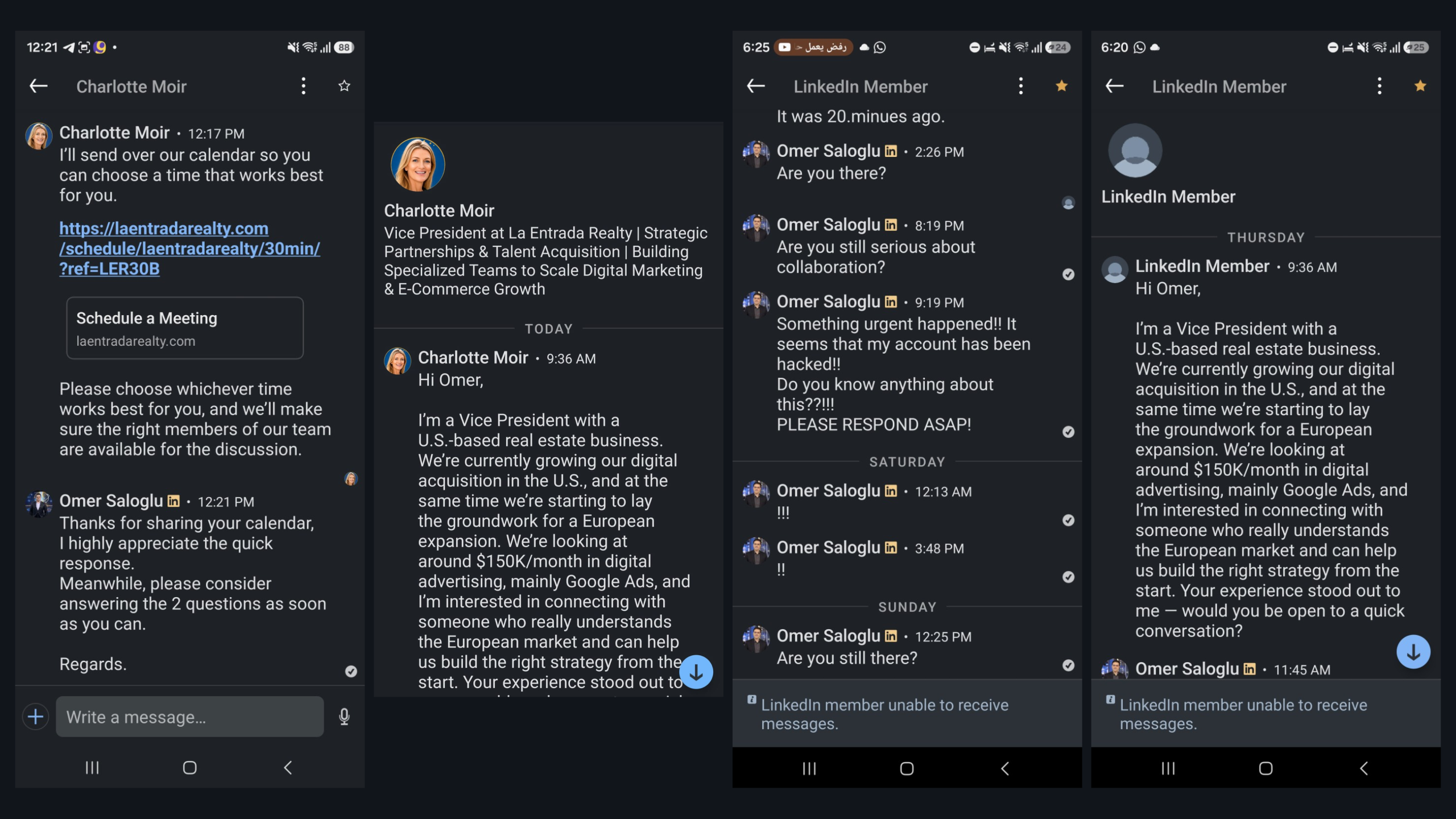
I received no reply.
Later, when I returned to the conversation from my own LinkedIn account, the profile no longer appeared normally. Instead, LinkedIn displayed:
“LinkedIn Member”
“LinkedIn member unable to receive messages.”
On its own, that would not have been enough to determine what happened. A LinkedIn profile can become unavailable for several reasons, including deletion, restriction, deactivation, or blocking.
So I performed a simple cross-check:
I opened the exact same profile from another LinkedIn account.
The profile was still active and visible normally.
This confirmed that the profile had blocked my LinkedIn account rather than disappearing from LinkedIn altogether.
The timing is noteworthy: the block occurred after I sent messages indicating that I believed my Google account had been successfully compromised.
It would be tempting to conclude that whoever controlled the account believed the phishing flow had worked and therefore considered the interaction complete. However,
the block itself does not prove the operator’s motive or state of mind.
What This Follow-Up Establishes
- The LinkedIn account contacted me with the business proposal.
- It directed me toward the meeting-booking process documented in this investigation.
- I discovered and documented the fake Google authentication interface.
- I later contacted the account pretending that my Google account had been compromised.
- The account subsequently blocked my LinkedIn account.
- The same profile remained active and visible from another LinkedIn account.
This behavioral evidence does not replace the technical evidence documented earlier in this report, but it adds another notable event to the investigation timeline.
LinkedIn profile used in the approach:
linkedin.com/in/iamcharlottemoir/
Attribution note:
This identifies the LinkedIn account used during the interaction. It does not establish the real-world identity of the individual controlling that account.
Technical investigation · Quick read
What the evidence shows
This report separates what was directly observed from what the architecture suggests. Start with these four findings, then use the guide to inspect the evidence.
What started as a promising business opportunity quickly turned into one of the most convincing phishing setups I have personally investigated.
It began on LinkedIn.
A senior representative of what appeared to be a US real-estate company contacted me about a serious digital marketing project.
The numbers were attractive.
The conversation was professional.
The website looked polished.
The company supposedly wanted to expand into Europe, starting with markets including the UK, Germany, France and Spain.
The proposed advertising budget could eventually reach:
$150,000 per month.
Nothing about the opening conversation looked like the stereotypical scam.
There were no obvious spelling mistakes.
No cryptocurrency.
No suspicious attachment.
No request for money.
No ridiculous promise of instant wealth.
Instead, the conversation used the language of experienced marketers: acquisition, Google Ads, testing markets, tracking, lead quality and scaling according to performance.
Then I tried to book the meeting.
That is when the investigation changed completely.
Because the Google login window I was looking at was not Google.
It was a webpage pretending to be Google.
And technical inspection showed that the information entered into it was being sent to the real-estate website itself.
It Started With a Very Convincing LinkedIn Message
The initial approach looked like a valuable commercial lead.
The person contacting me presented the opportunity as a digital acquisition project for La Entrada Realty, a US real-estate operation supposedly preparing to expand its marketing activity into Europe.
The conversation was not vague.
It included specific commercial details.
The proposed structure involved approximately:
- $150,000 per month in advertising spend once scaled
- approximately 80% Google Ads
- approximately 20% other acquisition channels
- a fixed monthly management fee
- an additional performance incentive
- an initial launch in a small number of European markets
- further scaling based on acquisition economics and lead quality
![[Redacted illustrative composite based on the original LinkedIn profile and outreach screenshots preserved during the investigation.]](https://omaralshal.com/wp-content/uploads/2026/09/IMAGE-1-—-Screenshot-of-the-original-LinkedIn-approach-1024x576.png)
$30,000–$50,000 per month
across two or three markets.
The countries being considered included:
United Kingdom, Germany, France and Spain.
That is a perfectly plausible acquisition strategy.
Start smaller.
Validate tracking.
Measure the quality of leads.
Then scale.
![[ Screenshot of the reply explaining the $30K–$50K testing budget and naming the UK, Germany, France and Spain.]](https://omaralshal.com/wp-content/uploads/2026/09/IMAGE-2-—-Screenshot-of-the-reply--1024x576.png)
The Website Looked Professional
Before speaking to any new client, I normally review their website.
So I opened:
laentradarealty[.]com
At first glance, it looked good.
Very good, in fact.
The design was polished and consistent with a premium real-estate brokerage.
There were:
- property listings
- neighborhood guides
- buyer and seller pages
- agent profiles
- home valuation tools
- testimonials
- real-estate imagery
- Texas regulatory links
- luxury branding
The current homepage also presents La Entrada as a Houston-area real-estate operation and contains active-looking property listings. (La Entrada Realty)
![[Original screenshot captured during the investigation on September 17, 2026. — Full or partial screenshot of the La Entrada Realty homepage.]](https://omaralshal.com/wp-content/uploads/2026/09/IMAGE-3--1024x613.png)
The Other Website Changed Everything
The second domain was:
ivycorealty[.]com
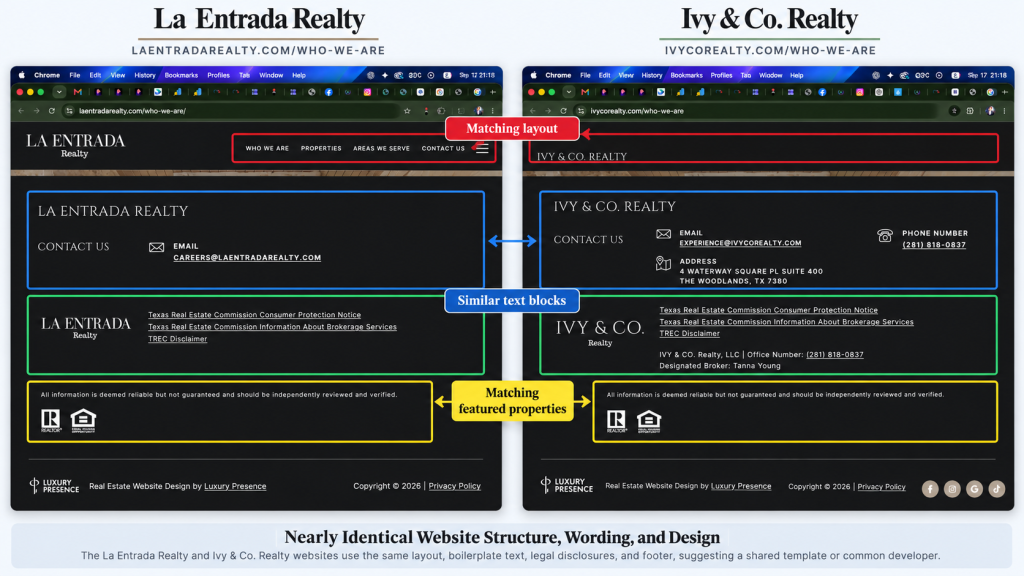
And the similarities were extraordinary.
This was not simply another real-estate website using the same general design style.
The two sites contained substantially matching structure, marketing language, neighborhoods, property listings and page organization.
For example, Ivy & Co.’s homepage currently includes the same positioning language, the same BUY / SELL / INVEST structure, the same neighborhood selection and the same featured properties that appear on La Entrada’s homepage. (Ivy & Co. Realty)
Even testimonial copy had effectively been reproduced with the company name changed.
- a telephone number
- a physical office address
- the legal name IVY & CO. Realty, LLC
- an office number
- Designated Broker: Tanna Young
- regulatory links
- normal contact information
The site currently lists (281) 818-0837, a Waterway Square address in The Woodlands, Texas, and identifies Tanna Young as the designated broker. (Ivy & Co. Realty)
By contrast, the La Entrada homepage and contact page I inspected exposed essentially an email address in the visible contact area rather than the same complete business footprint. (La Entrada Realty)
![[Illustrative comparison assembled from screenshots of both websites. Annotations highlight the differences in visible contact and business identity information.]](https://omaralshal.com/wp-content/uploads/2026/09/Image-5-1024x576.png)
Then the Clone Forgot to Change Its Own Name
The next clue was much harder to explain away.
Inside the La Entrada property-search experience, I tried to use the login functionality.
A login modal appeared.
But the branding inside the modal did not say La Entrada.
It said:
IVY & CO. Realty
Inside laentradarealty[.]com.
![[Original screenshot captured during the investigation on September 17, 2026. — Screenshot of the login modal on LaEntradaRealty.com still showing IVY & CO. Realty branding.]](https://omaralshal.com/wp-content/uploads/2026/09/Screenshot-2026-09-17-at-21.21.43-1024x666.png)
/api/v1/oauth2/start?provider=google...
The server responded:
The inherited Google OAuth interface appeared to expect a backend route that did not exist on the La Entrada deployment.
This suggested something important.
The frontend component existed.
But the infrastructure it originally expected was missing.
That is consistent with a frontend being copied or redeployed without its original backend integration.
Then Came the Meeting Scheduler
The next step in the supposed business process was booking a meeting.
The scheduling page was located at:
laentradarealty[.]com/schedule/laentradarealty/30min/?ref=LER30B
The page looked professional.
It displayed:
- a 15–30 minute meeting
- Google Meet
- automatic timezone detection
- a calendar
- selectable dates
- selectable times
- fields for name, email and phone number
![[Original screenshot captured during the investigation on September 17, 2026. — Screenshot showing the unusually broad appointment availability, including weekend/Sunday availability.]](https://omaralshal.com/wp-content/uploads/2026/09/image-9-1024x581.png)
![[Original screenshot captured during the investigation on September 17, 2026. — Screenshot of the source code highlighting noindex, nofollow, noarchive.]](https://omaralshal.com/wp-content/uploads/2026/09/source-1024x610.png)
The Scheduler Was Not a Google Scheduling System
The calendar interface was custom-built.
The HTML contained empty containers such as:
<div class="dt-days" id="dt-days"></div>
<div class="dt-slots" id="dt-slots"></div>
The dates and appointment slots were being populated by JavaScript.
There was no ordinary Google Calendar scheduling widget visible in the HTML.
The page also contained:
<meta name="robots" content="noindex, nofollow, noarchive">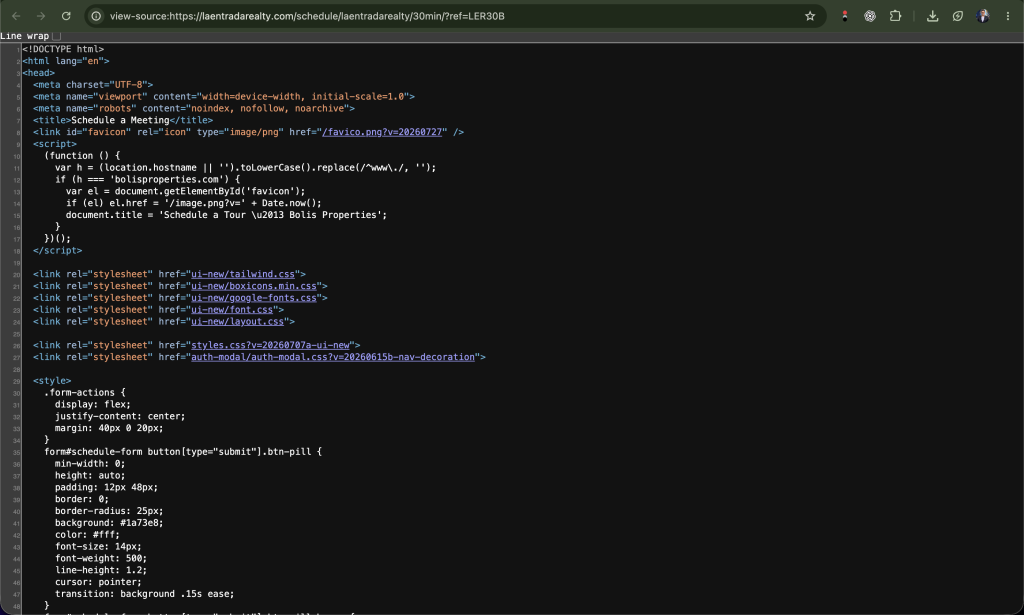
noindex on a scheduling page is not inherently malicious.Plenty of legitimate private booking systems do it.But another piece of code was much more interesting.The same source contained:
if (h === 'bolisproperties.com') {
    var el = document.getElementById('favicon');
    if (el) el.href = '/image.png?v=' + Date.now();
    document.title = 'Schedule a Tour – Bolis Properties';
}bolisproperties[.]com was not operating as a normal active website.Regardless of what that domain was previously used for, its presence proves that this scheduling template had been written to operate under more than one brand.In a legitimate environment that could theoretically represent a white-label scheduling product.In the context of everything else uncovered here, it raised a much more serious question:Was this system designed to be rapidly reused across different domains and identities?The source code proves reuse.
It does not, by itself, prove who reused it or how many times.
Then “Google” Asked Me to Sign In
At this point, the booking process led to what appeared to be a Google authentication window.
Visually, it was convincing.
It contained:
- the Google logo
- familiar Google typography
- a browser-style window frame
- a URL beginning with
https://accounts.google.com/ - an email field
- familiar Google sign-in language
A normal user could very reasonably conclude that Google had opened.
Original screen recording captured during testing. No real password or MFA code was submitted. – Watch the Fake Google Login in Action
This recording shows the interface exactly as it appeared during testing. No real password or MFA code was used.
![[Original screenshot captured during the investigation on September 17, 2026. — Screenshot of the complete fake Google login window with the apparent accounts.google.com address visible.]](https://omaralshal.com/wp-content/uploads/2026/09/IMAGE-12--1024x614.png)
The “Google URL” Was Just Editable HTML
Technical inspection revealed the element responsible for displaying the supposed Google URL.
It contained:
id="auth-modal-url-display"
contenteditable="true"
spellcheck="false"
Read that carefully.
The “Google address” was literally text inside an editable HTML element.
It was not Chrome’s address bar.
It was not browser security UI.
It was not proof that the page came from Google.
The apparent Google address bar was an editable HTML element rendered by the website.
The actual authentication iframe loaded from:
https://laentradarealty[.]com/83Xli8dQMtHFyTLskcYs
The frame was therefore being served by the real-estate domain itself.
Not Google.
The actual login iframe originated from LaEntradaRealty.com, not accounts.google.com.
The visual technique resembles what security researchers commonly call Browser-in-the-Browser, where a fake browser window is rendered inside a webpage to make an authentication prompt appear to originate from a trusted provider.
The visual deception is only one part of the attack.
The network activity is much more important.
The Fake Google Page Was Barely Functional
Once I realized the browser window itself was fake, I started testing the controls.
The results were revealing.
Help
Did not open a help page.
Privacy
Did not display Google’s privacy policy.
Terms
Did not open terms of service.
Change language
The element could receive focus, but no language menu appeared and the interface did not change language.
Create account
The control could receive focus, but no Google account creation workflow opened.
Forgot email?
No normal Google recovery process opened.
Close
Worked.
It closed the fake browser window and returned to the scheduling page.
Next
Worked.
It transmitted the entered email address.
That pattern is important.
The interface did not reproduce Google’s ecosystem.
It reproduced the pieces necessary to move a victim forward through an authentication sequence.
Most secondary Google controls were decorative. The authentication path itself was the part that worked.
HTML inspection supported that observation.
The footer items were written as:
<a class="TrZEUc AVAq4d">Help</a>
<a class="TrZEUc AVAq4d">Privacy</a>
<a class="TrZEUc AVAq4d">Terms</a>
No href destination was present.
Such elements can technically still be handled by JavaScript, so missing href attributes alone do not prove phishing.
But during the interactive test, the expected functions did not occur.
That makes them useful supporting evidence of imitation rather than real Google functionality.
The Network Request Removed Any Remaining Doubt
To test the login safely, I entered a completely fake address:
security-test@example.com
No real Google account was used.
No real password was entered.
No MFA code was entered.
When I clicked Next, the browser sent:
POST /api/auth
Host: laentradarealty[.]com
Content-Type: application/json
with the body:
{
  "email": "security-test@example.com"
}
Clicking Next sent the test email to LaEntradaRealty.com’s own /api/auth endpoint.
A second request was observed:
POST /api/track-stepwith:
{
  "step": "email",
  "email": "security-test@example.com"
}
The site also recorded the current authentication stage through /api/track-step.
The server responded:
{
  "success": false,
  "data": {
    "error": "COULDNT_FIND_ACCOUNT",
    "message": "Couldn't find your Google Account"
  }
}
The fake Google window then displayed:
The Code Goes Beyond Collecting Email Addresses
The authentication system included a JavaScript file:
auth-handler.obf.js
The file was obfuscated.
However, readable sections and execution paths exposed additional authentication functionality.
The inspected code contained:
- a password input field
- a function named
goPassword - logic reading the password input
- a JSON request to a local endpoint beginning with
/api/set-p… - a field called
totpPin - POST logic connected to an endpoint beginning with
/api/enter… - session-tracking functions
- dynamic HTML-loading functions
Observed function names included:
goPassword
setForm
checkSession
syncUrlThenLoadHtml
loadHtmlgoPassword. Highlight only the relevant lines.]The authentication code included a password stage and logic for sending password-related data to a local API endpoint.
Another portion dealt with:
totpPin
and verification-related logic.
![[Illustrative reconstruction based on the MFA/TOTP-related logic identified in the inspected JavaScript. This is not an original DevTools capture and no real MFA code was submitted during testing.]](https://omaralshal.com/wp-content/uploads/2026/09/image-20-1024x576.png)
… are intentionally reproduced only to the extent they were readable in the inspected obfuscated code.The file was not fully de-obfuscated during the test.But the important point is clear:This was not simply an email collection form.The authentication architecture contained stages for:Email → Password → Verification code
One Developer Comment Was Particularly Revealing
Inside the code was a comment stating:
![[“Kameleo browser”.]](https://omaralshal.com/wp-content/uploads/2026/09/Kameleo-browser-1024x630.webp)
Importantly, the comment tells us what the developer says the code is doing.
It is not, by itself, independent proof of what was running on the backend server.
How the Attack Appears to Work
At this point, it is important to distinguish between two things.
What Was Directly Proven
The following were directly observed:
- A fake browser window impersonated Google.
- The Google-looking address bar was HTML.
- The login iframe originated from LaEntradaRealty.com.
- The entered email was transmitted to LaEntradaRealty.com’s
/api/auth. - The system tracked the email authentication stage.
- The backend returned Google-style account-status text.
- JavaScript contained password-processing logic.
- JavaScript contained TOTP/MFA-related logic.
- Session-management functions were present.
- The code explicitly referenced a Kameleo browser.
What the Architecture Strongly Suggests
The most plausible authentication flow is:
Step 1 — Victim enters Google email
The fake Google interface collects the email address.
Step 2 — The website backend receives it
The address is transmitted to /api/auth.
Step 3 — A controlled browser attempts the real login
Based on the Kameleo reference, the backend may use an automated or remotely controlled browser to interact with Google’s genuine authentication system.
Step 4 — Google requests the password
The real authentication session moves to the password stage.
Step 5 — The fake interface follows that stage
The victim is shown a password form.
Step 6 — The victim enters the password
The code reads the password and transmits it to the site’s backend.
Step 7 — The controlled browser enters the password
The backend can potentially relay it into the ongoing genuine Google login.
Step 8 — Google requires additional verification
Google may request TOTP or another authentication challenge.
Step 9 — The fake interface presents a verification stage
The site’s code contains handling for totpPin and additional authentication steps.
Step 10 — The victim enters the code
That code can potentially be relayed immediately into the genuine login session.
Step 11 — The controlled browser becomes authenticated
If Google accepts all factors, the session running in the environment controlled by the operator could become authenticated.
![[Illustrative attack-flow diagram based on confirmed findings and behavior strongly indicated by the inspected code. The final authenticated-session stage was not experimentally tested.]](https://omaralshal.com/wp-content/uploads/2026/09/IMAGE-22--1024x576.png)
Why 2FA May Not Protect a Victim From This Type of Attack
A common reaction to phishing is:
That protection depends heavily on the type of MFA and how the phishing attack works.
In real-time adversary-in-the-middle attacks, a victim can unknowingly participate in the real authentication flow.
Microsoft describes AiTM phishing as a technique in which attackers position themselves between the victim and the legitimate service in order to capture authentication material and, in some campaigns, intercept MFA and obtain authenticated session access. (Microsoft)
Microsoft has also documented recent social-engineering campaigns in which convincing authentication lures were used to guide users through credential or authentication flows before identity and cloud compromise. (Microsoft)
This does not establish that the tested La Entrada infrastructure uses the exact same implementation as any Microsoft-documented campaign.
The comparison is useful because it explains why stealing a one-time code in real time can still be dangerous.
The attacker does not necessarily need to save the code.
It may be used immediately against an authentication session already in progress.
The Social Engineering Was as Important as the Code
It is easy to focus on the fake Google login.
But that is only the last stage.
The attack started much earlier.
First came a professional LinkedIn approach.
Then a credible company story.
Then a large but believable media budget.
Then European expansion.
Then detailed answers about acquisition strategy.
Then a meeting.
Then a booking page.
And only after trust had been established did the authentication prompt appear.
That sequencing matters.
Someone who would immediately distrust a random Google login link may behave very differently after spending time discussing a potentially valuable contract with what appears to be a legitimate business executive.
The technical phishing page did not create the trust.
The conversation did.
Why Marketing Professionals Are Valuable Targets
The original approach was specifically about marketing.
That matters because a Google account belonging to a marketer, consultant, creator or agency owner can potentially connect to many valuable systems.
Depending on the account, these can include:
- Gmail
- Google Drive
- Google Ads
- Google Analytics
- Search Console
- YouTube
- Google Workspace
- client documents
- advertising billing
- shared brand accounts
- recovery emails for unrelated services
I did not establish which Google product, if any, was the ultimate intended target.
It would be irresponsible to claim that Gmail, YouTube or Google Ads was definitely the objective.
But the commercial profile of the target helps explain why business-focused phishing can be much more valuable than indiscriminate credential harvesting.
The Real-Estate Website Itself Contains Multiple Cloning Clues
By this stage, several independent clues were pointing in the same direction.
1. Closely matching Ivy & Co. content
The two homepages contain matching structure, positioning, properties and large amounts of equivalent text. (Ivy & Co. Realty)
2. La Entrada retained IVY & CO. branding internally
The login modal still displayed the apparent source brand.
3. The inherited OAuth route was broken
The copied interface expected infrastructure that the La Entrada deployment did not provide.
4. The visible business footprint was thinner
Ivy’s homepage displayed a phone number, address, legal company name and broker information. (Ivy & Co. Realty)
La Entrada’s current homepage/contact experience exposed far less identifying information in its visible contact blocks. (La Entrada Realty)
5. The scheduler supported another domain
The code contained explicit handling for bolisproperties[.]com.
6. The authentication flow was custom
The fake Google interface and its backend endpoints were separate from the site’s broken inherited Google OAuth functionality.
Taken together, these details are consistent with an incompletely rebranded or cloned real-estate frontend to which a separate phishing-oriented scheduling/authentication system was added.
That is a technical assessment of the observed website architecture.
It is not proof of who created or operated it.
Evidence Summary
| Finding | Status |
|---|---|
| Google-looking window rendered inside La Entrada | Confirmed |
| Displayed accounts.google.com address was HTML | Confirmed |
URL element was contenteditable |
Confirmed |
| Login iframe originated from LaEntradaRealty.com | Confirmed |
Test email sent to /api/auth |
Confirmed |
Authentication stage sent to /api/track-step |
Confirmed |
| Google-style error returned by La Entrada backend | Confirmed |
| Password-handling code present | Confirmed from inspected code |
| TOTP/MFA-related code present | Confirmed from inspected code |
| Fake Google Help/Privacy/Terms did not function normally | Confirmed during testing |
| Language control did not behave like Google’s | Confirmed during testing |
| Create-account flow did not function normally | Confirmed during testing |
| IVY & CO. branding remained inside La Entrada | Confirmed |
| Inherited Google OAuth endpoint was broken | Confirmed |
Scheduling code referenced bolisproperties.com |
Confirmed |
| Source code referenced “Kameleo browser” | Confirmed as a source-code comment |
| Kameleo supports browser automation | Confirmed by Kameleo documentation |
| Backend uses a controlled browser to relay Google authentication | Strongly suggested, not independently observed server-side |
| A successful Google session was obtained by the operator | Not tested |
| Gmail was the final objective | Unknown |
| Google Ads was the final objective | Unknown |
| YouTube was the final objective | Unknown |
| Identity of the phishing infrastructure operator | Unknown |
| Number of victims | Unknown |
| Whether the domain itself was created for phishing or later compromised | Not conclusively established by this test |
![[Illustrative evidence summary. Confirmed findings are separated from interpretations and unresolved questions; the graphic itself is not forensic evidence.]](https://omaralshal.com/wp-content/uploads/2026/09/IMAGE-23--1024x576.png)
Important: What This Investigation Does Not Accuse
This point deserves emphasis.
The investigation is about:
the domain, the tested page and the code behaviour.
It does not establish that every person or company whose information appears on that website participated in the phishing operation.
Ivy & Co. itself has a functioning website with detailed brokerage information, contact details and a designated broker. (Ivy & Co. Realty)
The presence of copied branding, properties, photographs or names can mean that genuine individuals and businesses are themselves being impersonated.
Likewise, the appearance of the word Kameleo in the code does not imply wrongdoing by Kameleo.
Kameleo is a legitimate commercial automation platform. Its official material describes browser profiles and integrations with Playwright, Puppeteer and Selenium. (Kameleo)
The relevant issue is how such technology appears to have been referenced inside the tested authentication system.
Indicators Observed During the Investigation
Domain
laentradarealty[.]com
Scheduling path
/schedule/laentradarealty/30min/?ref=LER30B
Observed fake authentication iframe path
/83Xli8dQMtHFyTLskcYs
Observed API endpoints
/api/auth
/api/track-step
Authentication JavaScript
auth-handler.obf.js
Additional password and verification endpoints were visible only partially inside obfuscated JavaScript and are therefore not reproduced here as complete routes.
Additional domain referenced in scheduling source
bolisproperties[.]com
What To Do If You Entered Real Google Credentials
If you interacted with the tested interface and entered a real Google password, verification code or other authentication information, treat the account as potentially compromised.
Use a trusted device and go directly to Google’s account security controls.
Recommended immediate actions include:
- Change the Google account password.
- Review recent security activity.
- Sign out of unfamiliar devices and sessions.
- Review recovery email addresses and phone numbers.
- Review two-step verification methods.
- Remove unfamiliar passkeys, authenticator entries or security keys.
- Review third-party applications with account access.
- Check Gmail forwarding addresses, filters and delegation.
- Review Google Ads activity if the account controls advertising.
- Review YouTube channel permissions if applicable.
- Review Drive sharing activity and sensitive documents.
- Change passwords on other services if the same password was reused.
Do not return to the suspicious page to perform any of these steps.
How To Spot a Fake Browser-in-the-Browser Login
The visual quality of these attacks means that simply seeing a familiar logo is not enough.
Look for clues such as:
- a login window that cannot be moved outside the original browser tab
- an address bar that behaves like webpage content
- Help, Privacy or Terms links that do nothing
- broken language controls
- broken account creation controls
- login flows appearing after an unrelated business process
- credentials being requested inside a site that should have no reason to receive them
Most importantly:
The security boundary is your real browser address bar — not an address bar drawn inside a webpage.
FAQ
Is LaEntradaRealty.com safe?
Based on my technical test conducted on September 17, 2026, the specific scheduling and authentication flow described in this investigation should be treated as unsafe.
The tested page displayed a fake Google authentication interface and transmitted the entered email address to LaEntradaRealty.com’s own backend.
This conclusion concerns the observed technical behaviour.
It does not establish the identity of whoever operates the infrastructure.
Is the Google login on LaEntradaRealty.com real?
The login interface tested in this investigation was not hosted by Google.
The apparent Google URL was an editable HTML element, while the authentication iframe originated from laentradarealty[.]com.
What is Browser-in-the-Browser phishing?
Browser-in-the-Browser phishing is a visual deception technique in which a website draws a fake browser or authentication popup inside the existing webpage.
The fake window can include a convincing logo, URL and login form even though the victim has never left the attacker’s domain.
Does the site collect passwords?
The test did not submit a real password.
However, the inspected authentication JavaScript contained a password field and code for reading password input and sending password-related data to a local API route.
Does the code handle 2FA or MFA?
The inspected code contained handling for a field named totpPin and additional verification-related logic.
The investigation did not submit a real MFA code.
Can phishing bypass two-factor authentication?
Some real-time phishing methods can relay authentication challenges or capture authenticated session material.
Microsoft has documented adversary-in-the-middle campaigns capable of bypassing traditional, non-phishing-resistant MFA by intercepting authentication in real time. (Microsoft)
Was a Google account actually stolen during this investigation?
No.
A fake email address was deliberately used.
No real password was entered.
No real MFA code was entered.
The investigation therefore established the phishing interface and authentication-processing architecture without deliberately sacrificing a real account.
Final Conclusion
This investigation began with a LinkedIn message that looked like a legitimate high-value business opportunity.
The supposed project involved:
- a real-estate company
- a professional website
- European expansion
- Google Ads
- a potential $150,000 monthly media budget
- realistic testing budgets
- credible marketing terminology
- a scheduled meeting
The setup was convincing because it was not built around one obvious lie.
It was built around layers of trust.
But technical inspection revealed a very different picture:
- a real-estate website containing substantial content matching another brokerage website
- incomplete rebranding artifacts
- IVY & CO. branding left inside La Entrada
- a broken inherited OAuth integration
- unusually sparse visible business identity information
- a reusable scheduler referencing another domain
- a fake Google browser window
- an editable fake Google address bar
- an iframe hosted by the real-estate domain rather than Google
- non-functional Google navigation elements
- email addresses transmitted to
/api/auth - authentication-stage tracking
- password-handling logic
- MFA/TOTP-related logic
- session-management code
- and a source-code reference to a Kameleo browser
These are not merely cosmetic anomalies.
Taken together, they provide strong technical evidence that the tested authentication interface was designed to impersonate Google and process authentication information.
What remains unknown is the identity of the person operating the infrastructure and what would happen after a successful authentication sequence.
That distinction is important.
A phishing page can be technically proven.
Attributing it to a specific human being requires a different level of evidence.
The Real Lesson
The most dangerous scams are no longer always badly written.
They can arrive through LinkedIn.
They can speak fluent business.
They can understand performance marketing.
They can discuss attribution and lead quality.
They can quote realistic advertising budgets.
They can clone beautiful websites.
They can copy legitimate businesses.
And they can draw a Google login screen so convincing that the victim never realizes they are still inside the attacker’s webpage.
The biggest warning sign may no longer be that something looks fake.
Sometimes the danger begins because everything looks almost perfect.
![[Illustrative warning graphic based on the observed fake Google interface. The highlighted lesson is that a URL drawn inside a webpage is not the browser’s trusted address bar.]](https://omaralshal.com/wp-content/uploads/2026/09/IMAGE-24--1024x576.png)
Investigation methodology
The findings in this article were based on:
- manual inspection of the webpages
- comparison with the apparent source website
- HTML source inspection
- browser developer tools
- frame-origin inspection
- JavaScript inspection
- network-request monitoring
- interaction using a deliberately fake email address
- screenshots and screen recording
No real Google password or verification code was submitted.
Evidence preservation note
Original copies of relevant evidence should be preserved separately from annotated publication images, including:
- original screenshots
- full screen recordings
- page source
- downloaded JavaScript files
- network HAR export
- timestamps
- browser and user-agent information
- cryptographic SHA-256 hashes of downloaded evidence files
This is particularly important because phishing infrastructure can disappear or change quickly after publication or reporting.
External technical references
Kameleo’s official documentation confirms that its platform supports automated browser profiles controlled through frameworks such as Playwright, Puppeteer and Selenium. (Kameleo)
Microsoft’s security research explains how adversary-in-the-middle phishing can intercept authentication in real time and, in some attack models, circumvent traditional MFA protections by obtaining authenticated session access. (Microsoft)
Investigation and technical analysis by Omar Alshal
Last updated: September 22, 2026