
Site Admin
-
14/09/2026
Best Free AI Video Generators in 2026
Generative Video AI
Reading & Testing Time: 20 min
Best Free AI Video Generators in 2026
A comprehensive, no-nonsense reality check: Open-Weight Models vs. renewable cloud credit tiers. We break down exact math for real-world production: How many videos can you actually generate for free?
Search for “free AI video generator” and you’ll find dozens of websites promising free AI video creation.
The problem is that the word free has become surprisingly misleading.
There is a big difference between:
- An open-weight model you can download and run yourself.
- A service that gives you free credits every day or every month.
- A platform that gives you a few welcome credits once, then asks you to pay.
- A website that advertises a “Free AI Video Generator” even though video generation itself is not included in its free plan.
This guide takes a stricter approach. Instead of listing every AI video tool on the market, we’ll focus on tools you can actually use without paying, and answer the question that matters most: How many videos can you realistically generate for free?
Last updated: September 2026. AI video pricing and free-credit policies change frequently, so always check the balance and generation cost shown inside your account before starting a large project.
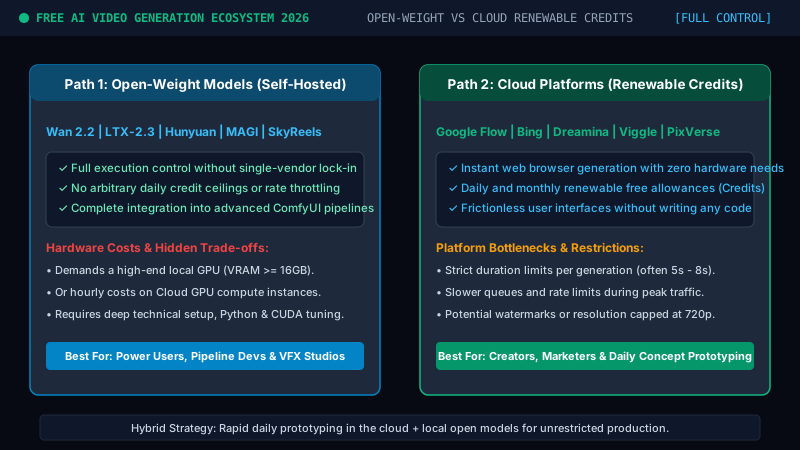
Figure 1.1: Structural comparison between Open-Weight Models (full control, compute cost) and Cloud Platforms (renewable credit tiers).
Table of Contents
- Part One: Open AI Video Models You Can Use for Free (Open-Weight Models)
- Part Two: The 10 Best AI Video Tools With Renewable Free Usage (Comparison Table)
- Detailed Breakdown: 10 Free Tools & Real Clip Calculations
- What About Kling AI, Runway, and Hailuo? Why They Were Excluded
- What Is the Best Free AI Video Generator in 2026 by Goal?
- Is There a Truly Unlimited Free AI Video Generator?
- The Best Strategy for Generating AI Videos for Free (Daily Budget)
- Final Thoughts: The 4 Questions to Audit Any Free Tool
- Interactive Masterclass Challenge
- Frequently Asked Questions (SEO FAQ)
Part One: Open AI Video Models You Can Use for Free
Before looking at websites that give away free credits, there is another route: open-weight AI video models.
The advantage is that you are not completely dependent on a company deciding how many credits to give you today—or changing the free plan tomorrow.
You can download the model and run it yourself, or use a hosted version through platforms such as Hugging Face.
There is one important distinction, though:
A free model does not mean free computing. Running a video model locally requires a capable GPU. Running it in the cloud may also cost money. However, some models are available through free hosted services such as Hugging Face ZeroGPU, making them much easier to experiment with.
1. Wan 2.2
If you want to start with one open AI video model, Wan 2.2 is one of the strongest places to begin. The model is available with downloadable weights and code, with variants designed for tasks such as Text-to-Video and Image-to-Video.
One of Wan’s biggest advantages is that you do not necessarily have to install everything locally. Community-hosted versions are also available through platforms such as Hugging Face, allowing you to test the model before deciding whether to build a local workflow around it.
Free access: The model itself is open. You still need either a local GPU or access to hosted compute.
2. LTX-2.3 (by Lightricks)
LTX-2.3 from Lightricks is one of the most interesting open video models currently available. What makes it especially notable is that it is designed around generating video and synchronized audio, rather than treating sound as a completely separate step.
It supports workflows such as Text-to-Video and Image-to-Video, with different versions designed for higher quality or faster generation. Lightricks also provides hosted ways to experiment with LTX, which makes it significantly easier to try than many heavyweight open models.
Free access: The model can be run locally, and hosted demos may also be available.
3. HunyuanVideo 1.5 (by Tencent)
Tencent designed HunyuanVideo 1.5 as a powerful video model that is relatively more accessible than some of the enormous models in this category. The model has approximately 8.3 billion parameters and is designed to be more practical for consumer GPU setups than much larger alternatives.
It supports both Text-to-Video and Image-to-Video, and Tencent provides model weights along with inference and training code. One important detail is licensing: HunyuanVideo uses the Tencent Hunyuan Community License, rather than Apache 2.0, so you should review its terms before using the model in a commercial project or in certain regions.
Free access: Weights and code are available, but you need suitable hardware to run it.
4. MAGI-1.1
MAGI takes a slightly different approach from many other AI video models. It uses an autoregressive video generation architecture, generating video progressively across temporal segments. That makes it particularly interesting for longer video generation and temporal continuity.
The project includes MAGI-1.1 24B, along with distilled and quantized variants. MAGI is released under the Apache License 2.0, which makes its licensing relatively straightforward compared with several other open video models. That said, I would not recommend MAGI as the first option for someone who simply wants to generate a quick AI clip. It is more appropriate for technical users and advanced local workflows.
Free access: The model is open, but hardware requirements can be significant.
5. SkyReels V3
SkyReels V3 is interesting because it goes beyond conventional Text-to-Video generation. Its capabilities focus heavily on areas such as:
- Reference-to-Video
- Audio-driven video
- Video-to-Video
- Video extension
- Talking avatars
That makes SkyReels particularly useful when character consistency, motion, reference images, or dialogue-driven video matter more than simply typing a prompt and generating a random scene.
Free access: The model weights and code are available, but you need appropriate computing resources.
Part Two: The 10 Best AI Video Tools With Renewable Free Usage
Now we move to the easier option for most users. No model downloads. No ComfyUI setup. No worrying about VRAM. You simply open the website, create an account, and start generating.
The important question is: What exactly do you get for free—and how many videos does that actually mean?
| Tool | Free allowance | Renewal | Roughly what does it give you? |
|---|---|---|---|
| Google Flow | 50 credits | Daily | Up to 5 Veo 3.1 Lite videos |
| Bing Video Creator | Free Standard mode | Ongoing | Free Standard generations |
| Dreamina | 120 credits | Daily | Depends on model and settings |
| Viggle | 5 videos | Daily | 5 videos |
| PixVerse | 30 web credits | Daily | At least one low-cost generation |
| Krea | 100 Compute Units | Daily | Depends on model |
| Leonardo AI | 150 tokens | Daily | Depends on model |
| Pika | 80 video credits | Monthly | Around 6 basic videos |
| Vidu | 40 credits | Monthly | Around 2 basic videos |
| Adobe Firefly | Limited free generations | Daily | No fixed public number |
Detailed Breakdown of the 10 Free Tools & Output Calculations
1. Google Flow — One of the Best Free Offers Right Now
Google Flow is currently one of the strongest free AI video options available. A free account receives: 50 credits per day.
But the real question is what those 50 credits can actually produce:
Veo 3.1 Lite
A basic generation can cost around 10 credits per video.
That means: 50 ÷ 10 = 5 free videos per day.
Gemini Omni Flash
For a 720p video around 8 seconds long, the cost may be around 12 credits. That gives you roughly 4 videos per day.
A 10-second generation costing around 15 credits would give you 3 videos per day, with a few credits left over.
Bottom line: If your goal is to maximize your free daily allowance, Veo 3.1 Lite can currently give you approximately 5 free AI videos every day.
2. Bing Video Creator — The Closest Thing to Unlimited Free AI Video
Microsoft uses a different model from most credit-based AI video services. Bing generally separates generation into Fast and Standard modes.
Fast generations may depend on boosts or limited free allowances, while Standard mode can be used without the same traditional credit system.
The trade-off is speed. Standard generations can take considerably longer when demand is high. But if speed is not your priority, Bing is one of the most interesting options for generating a large number of videos without paying for a subscription.
Bottom line: One of the best options if you care more about zero cost than generation speed.
3. Dreamina — 120 Free Credits Every Day
Dreamina by CapCut currently gives free users: 120 credits every day.
However, it would be misleading to say that 120 credits always equals a specific number of videos. Generation cost depends on factors such as:
- Model
- Video length
- Resolution
- Generation mode
- References
- Additional features
So the most accurate approach is to check the credit cost displayed next to the Generate button before starting.
Bottom line: 120 free credits per day, but the actual number of videos depends on the generation settings you choose.
4. Viggle — Five Free Videos Every Day
Viggle makes the free allowance extremely easy to understand. The free plan currently allows approximately: 5 videos per day.
Viggle is especially strong for:
- Character animation
- Motion transfer
- AI dance videos
- Face swap workflows
- Animating human characters from images
Quick calculation
5 videos × 30 days = up to 150 free videos per month, in theory (assuming you use your full daily allowance every day).
5. PixVerse — Daily Credits for Quick Experiments
PixVerse is one of the most popular AI video platforms and offers a free plan based on renewable credits.
Its web subscription page currently shows approximately: 30 free credits per day, plus additional credits for new accounts.
You may see a different number in the mobile app or on certain accounts, so the balance displayed inside your own account should always be treated as the final reference.
Video generation may cost different amounts depending on: model, resolution, duration, and generation type. Some generations may cost roughly 20, 40, or 60 credits.
Bottom line: 30 daily credits can usually cover at least one low-cost generation per day. You may get more depending on your account or the model you choose.
6. Krea — 100 Compute Units Every Day
Krea’s main advantage is that it is not tied to a single model. It acts more like a platform where you can access several different image and video models from one interface.
The free plan currently includes approximately: 100 Compute Units per day.
The problem is that different models consume different amounts of compute. So there is no honest universal equation such as 100 units = 3 videos. The actual cost depends on the specific model and settings you use.
Bottom line: Krea’s real advantage is not necessarily maximum volume; it is the ability to experiment with multiple models from a single platform.
7. Leonardo AI — 150 Free Tokens Every Day
Leonardo AI gives free users approximately: 150 tokens every 24 hours.
Some AI video models are available to free users. However, the number of videos you can generate cannot be reduced to one simple figure because each video model and setting has a different token cost.
Leonardo shows the actual cost before you press Generate. So it is best to think of the 150 tokens as a daily budget that you can spend across whichever free video options are currently available.
8. Pika — 80 Free Video Credits Every Month
Pika does not currently give you daily credits. Instead, its free plan provides approximately: 80 video credits per month.
This one is easier to calculate. A basic Pika 2.5 Text-to-Video or Image-to-Video generation at around 480p and 5 seconds can cost approximately 12 credits.
Calculation: 80 ÷ 12 = 6 full videos per month, with a few credits remaining. More advanced features such as effects, swaps, or scene tools may consume more credits.
9. Vidu — 40 Free Credits Per Month
Vidu currently gives free users around: 40 credits per month.
As an economical example, a short basic generation in some Vidu modes can cost approximately 20 credits.
Calculation: 40 ÷ 20 = around 2 basic videos per month. Higher-resolution generations, longer clips, or more advanced models may consume the entire monthly allowance in a single generation.
10. Adobe Firefly — Free Daily Generations
Adobe Firefly offers a free plan that includes a limited number of generations across images, video, and audio.
The problem is that Adobe does not currently publish a simple fixed figure such as: 5 free videos per day. So it would be inaccurate to invent a number.
Bottom line: You can generate AI video for free inside Firefly, but the exact number of free daily generations is not presented as a fixed universal allowance.
What About Kling AI, Runway, and Hailuo?
You may have noticed that several major AI video names are missing from the top 10: Kling AI, Runway, and Hailuo AI. That is not because they are weak products. It is because this guide focuses on renewable free usage that you can reasonably rely on.
Kling AI
Kling offers a free tier, free credits, and promotional credit campaigns. However, the amount of renewable free credit is not currently consistent enough across all users to give it a dependable universal number. That is why I would not rely on the older figure of: 66 free credits per day which still appears in many outdated guides.
Runway
Runway is one of the strongest professional AI video platforms, but its free plan behaves more like a free trial than a permanently renewable free video plan. You receive an initial credit allowance, but it does not continuously refresh in the same way as Google Flow or Dreamina.
Hailuo AI
Hailuo has offered strong free promotions and daily-credit systems at different times. However, its free-credit structure has changed repeatedly. For that reason, it is not included among the tools where we can confidently promise a stable renewable allowance.
What Is the Best Free AI Video Generator in 2026?
There is no single answer. It depends on what you want:
- If your goal is to generate the largest possible number of videos without paying, start with: Bing Video Creator.
- If you want strong generation quality with a clearly defined daily allowance, Google Flow is one of the best current options. Its 50 daily credits can translate into approximately 5 Veo 3.1 Lite videos per day.
- If you want renewable credits for constant experimentation, try: Dreamina, Viggle, PixVerse, Krea, and Leonardo AI.
- If character animation is your main goal, Viggle is particularly attractive.
- And if you want to avoid the entire credit system and work with an open model instead, start with: Wan 2.2 or LTX-2.3.
Is There a Truly Unlimited Free AI Video Generator?
Usually: No.
AI video generation is one of the most computationally expensive applications of generative AI. So companies almost always place a limit somewhere:
- Credits
- Video duration
- Resolution
- Queue speed
- Number of generations
- Watermarks
- Available models
Open models do not completely remove the cost either. They simply move the cost from a subscription platform to: your own GPU, cloud GPU time, or hosted compute limits. So “free” almost always comes with some type of trade-off.
The Best Strategy for Generating AI Videos for Free
Do not rely on a single platform. Treat free AI video credits like a budget distributed across several services.
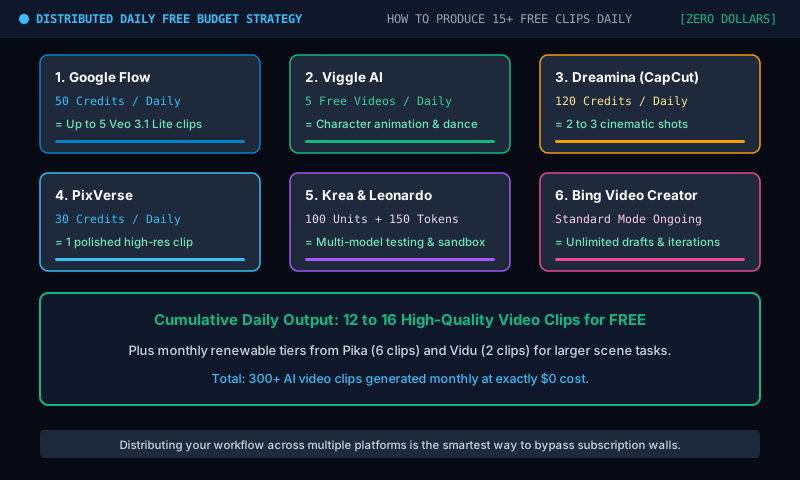
Figure 1.2: Daily production strategy: combining renewable daily credits to produce up to 16 free clips per day at $0 cost.
In a single day, for example, you may be able to:
- Generate up to 5 Veo 3.1 Lite videos with Google Flow.
- Generate another 5 videos with Viggle.
- Use your daily Dreamina credits.
- Run a generation on PixVerse.
- Spend your daily Krea Compute Units.
- Use your 150 Leonardo AI tokens.
- Continue submitting Standard generations to Bing if speed is not important.
Then you still have monthly allowances from services such as Pika and Vidu. Used together, these free tiers can let you test dozens of ideas and multiple AI video models every month without subscribing to ten different services.
Final Thoughts
The right question is no longer: “Is this AI video generator free?”
The better question is: “What exactly renews for free, and how many videos can I actually create with it?”
Because the phrase Free AI Video Generator can mean very different things. It may refer to an open model such as Wan that you can run yourself. It may mean Google Flow giving you 50 new credits every day. It may mean Bing letting you use its slower Standard mode for free. Or it may mean a platform giving you a few welcome credits once and nothing after that.
Before choosing any free AI video tool, always check four things:
- Does the free allowance renew? (Daily, monthly, or one-off signup bonus?)
- How much does one video cost? (Can you make 5 videos or only half a video?)
- What resolution and duration can you generate for free? (Is it 720p 5s or 1080p 10s?)
- Are there watermarks or commercial-use restrictions? (Can you use it for clients or social ads?)
Because the big number next to “Free Credits” is not what really matters.
How many videos can you actually make with them?
Masterclass Case: Pick the Ideal Free Production Stack
Scenario: You need to create a 9:16 vertical video ad for TikTok / Instagram Reels featuring a photo-realistic character dancing smoothly to trending music. You have zero budget ($0), a standard laptop (no discrete RTX GPU), and the client strictly forbids watermarks. Which free tool stack provides the highest success rate?
👉 Click here to reveal the expert breakdown & correct answer
✓ Correct Choice: Option B (Viggle AI + CapCut)
Why Option B wins: Viggle AI gives you 5 free character motion transfers daily directly in the browser—no heavy RTX graphics card needed. You can animate your character using a reference dance clip, then import into CapCut or Dreamina to trim borders or position overlays to cleanly avoid watermarks while syncing your soundtrack at $0 cost.
Why other options fail: Wan 2.2 requires 16GB+ VRAM (impossible on a basic laptop); Pika offers only ~6 short 480p clips per month with a prominent watermark; and Runway provides only a one-time trial without daily renewals.
Frequently Asked Questions (FAQ)
Can I use free AI video generators for commercial projects?
It depends strictly on the tool’s license. Open-weight models like MAGI-1.1 (Apache 2.0) explicitly grant unrestricted commercial usage. In contrast, cloud platforms (like Pika, PixVerse, or Leonardo) typically reserve commercial rights for paid tiers, reserving free accounts for personal/evaluation use. Always inspect the terms of service.
What is the best free AI video tool without any watermark?
Open-weight models (such as Wan 2.2 or LTX-2.3) never apply watermarks when run locally or via Hugging Face. Among cloud services, Google Flow (Veo 3.1 Lite) and Bing Video Creator provide clean generations without intrusive logo overlays on free outputs.
Do I need an expensive GPU to run open-weight models?
For full-resolution 1080p generation locally, an Nvidia GPU with at least 16GB to 24GB of VRAM (e.g., RTX 3090, 4080, or 4090) is strongly recommended. However, quantized 4-bit variants and hosted community spaces on Hugging Face ZeroGPU let you test these models without owning heavy hardware.
Why do Kling AI and Runway lack permanent daily free tiers?
Generating high-end video requires massive GPU server clusters costing tens of thousands of dollars daily. Platforms like Runway and Kling prioritize paying commercial subscribers with dedicated GPU queues, using free tiers primarily as onboarding trial funnels rather than permanent free production platforms.